
Green Nursery App Install
Install Green Nursery on Android, iPhone & iPad
Turn Green Nursery into an app-style shortcut on your phone or tablet for faster shopping, easier account access, quick order tracking, and one-tap access to rewards, new arrivals, and special offers.
Install Green Nursery on Your Phone
You can add Green Nursery to your home screen in less than a minute. There is nothing to download from the App Store or Google Play.
Once installed, Green Nursery opens in a dedicated app-style experience while still using the same secure Green Nursery website.
Android Instructions
If you use Chrome on Android:
- Open Green Nursery in Chrome.
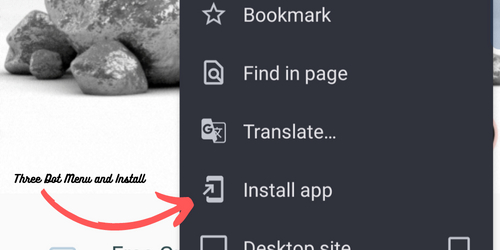
- Tap the three-dot menu in the upper-right corner.
- Select Install App or Add to Home screen.
- Confirm the installation.
Green Nursery will be added to your home screen and app drawer just like a traditional app.
iPhone & iPad Instructions
If you use Safari on iPhone or iPad:
- Open Green Nursery in Safari.
- Tap the Share button.
- Select Add to Home Screen.
- Tap Add.
Once installed, Green Nursery will appear on your home screen and open in an app-style view.
Visual Install Guide
The screenshot below shows the type of browser menu option you are looking for when installing Green Nursery to your phone.
Using Chrome, Firefox, Edge, Brave, or Another Browser on iPhone?
Apple requires home screen installation to be completed through Safari. If you are using another browser on iPhone or iPad, open Green Nursery in Safari first, then follow the iPhone and iPad steps above.
Why Install Green Nursery?
- Open Green Nursery quickly from your home screen.
- Get back to your account, rewards, and order history faster.
- Shop new arrivals and restocks without typing the website address.
- Use the same secure checkout and account login as the regular website.
Need Help?
If you have trouble adding Green Nursery to your phone or tablet, contact us and we’ll help walk you through it.
Email us at [email protected].